39 lines
1.8 KiB
Markdown
39 lines
1.8 KiB
Markdown
# Time
|
|
|
|
The time plugin allows you to create rules based on time, day, month, year, weekday or on weekend.
|
|
|
|
For the correct setup, you can configure the time zone in the plugin configuration. The language
|
|
of the "month name" and "weekday name" depends on the locale settings of your system. To have the correct
|
|
time you need [ntp](https://en.wikipedia.org/wiki/Network_Time_Protocol).
|
|
|
|
The weekday integer value stands for:
|
|
|
|
* Monday: `1`
|
|
* Tuesday: `2`
|
|
* Wednesday: `3`
|
|
* Thursday: `4`
|
|
* Friday: `5`
|
|
* Saturday: `6`
|
|
* Sunday: `7`
|
|
|
|
The *weekend* state will be true, if the current weekday is Saturday or Sunday, otherwise it will be false.
|
|
|
|
## Today
|
|
|
|
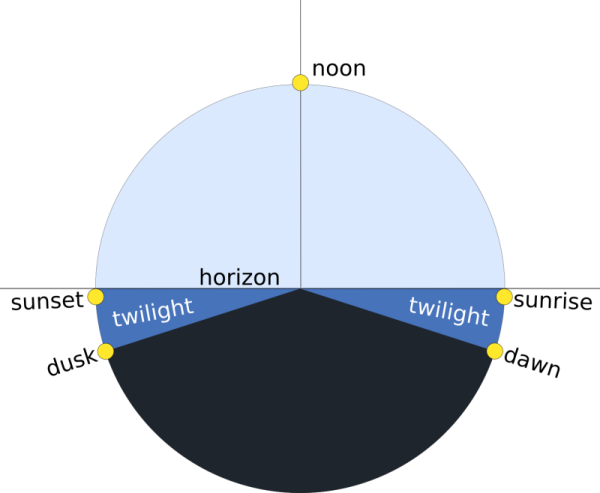
The today plugin gives you information about the current day and some special times of the day like
|
|
dawn, sunrise, noon, sunset and dawn. In order to get the correct times of the current day for your location, the plugin needs to know where you are. The plugin will autodetect your location according to you WAN IP [http://ip-api.com/json](http://ip-api.com/json) and will download the sunset / sunrise times from the online database [http://sunrise-sunset.org/](http://sunrise-sunset.org/).
|
|
If the configured timezone does not match with the autodetected timezone from the IP, the `specialdates` will be set to 0 (01.01.1970 - 00:00.00).
|
|
|
|
|
|
|
|
Special times of a day ([original source](https://en.wikipedia.org/wiki/Twilight#/media/File:Twilight_description_full_day.svg))
|
|
|
|
## Alarm
|
|
|
|
The alarm plugin allows you to define an alarm which depends on a certain time, weekday or special day time, like sunrise or
|
|
sunset. An offset can also be defined.
|
|
|
|
## Countdown
|
|
|
|
The countdown plugin allows you to define a countdown, which triggers an event on timeout.
|