
aWATTar
This plugin allows to receive the current energy market price from the aWATTar GmbH. In order to use this plugin you need to enter the access token from your energy provider. You can find more information about you accesstoken here.
Available data
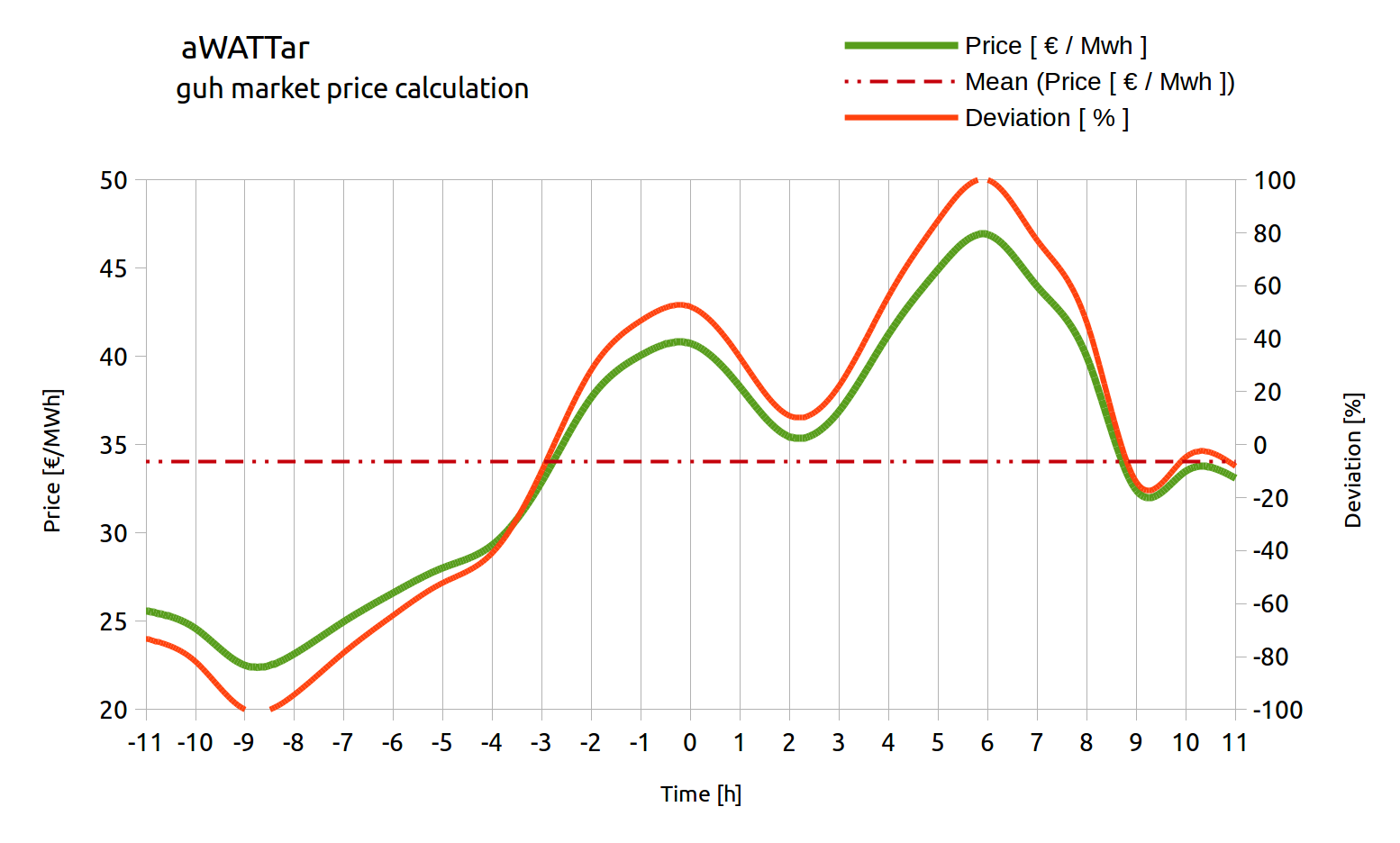
In following chart you can see an example of the market prices from -12 hours to + 12 hours from the current time (0).The green line describes the current market price, the red point line describes the average price of this interval and the red line describes the deviation. If the deviation is positiv, the current price is above the average, if the deviation is negative, the current price is below the average.
- -100 % current price equals lowest price in the interval [-12h < now < + 12h]
- 0 % current price equals average price in the interval [-12h < now < + 12h]
- +100 % current price equals highest price in the interval [-12h < now < + 12h]
Heat pump
Information about the smart grid modes can be found here.
In order to interact with the heat pump (SG-ready), this plugin creates a CoAP connection to the server running on the 6LoWPAN bridge. The server IPv6 can be configured in the plugin configuration. Once the connection is established, the plugin searches for 6LoWPAN neighbors in the network.